webmaster.webhulp94
Member
- Messages
- 35
- Reaction score
- 0
- Points
- 6
Hello,
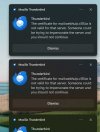
When I open my email application I get pop-ups with error -> Certificate to mail webhulp.x10.bz is not valid for that server. Someone could be trying to impersonate the server and you should not continue. <-
Before that error I got pop-ups -> Certificate mail for mail.webhulp.x10.bz expired on 10/1/2026 <-
Can you please fix this or at least let me know a solution for this problem so my email will work again.
Thanks in advance.
Best regards
When I open my email application I get pop-ups with error -> Certificate to mail webhulp.x10.bz is not valid for that server. Someone could be trying to impersonate the server and you should not continue. <-
Before that error I got pop-ups -> Certificate mail for mail.webhulp.x10.bz expired on 10/1/2026 <-
Can you please fix this or at least let me know a solution for this problem so my email will work again.
Thanks in advance.
Best regards