
WsapEvents
New Member
- Messages
- 7
- Reaction score
- 0
- Points
- 1
Hi x10hosting support team,
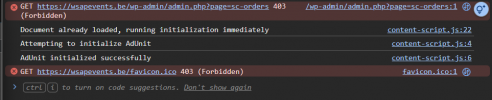
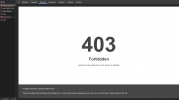
I am experiencing an issue where I am getting stuck in an infinite loop of intermittent 403 Forbidden errors while working in my WordPress backend.
My domain name: https://wsapevents.be/
Hosting Server Name: x10
The Symptoms:
I am using Cloudflare, but I have ruled them out as the cause. I checked the browser DevTools Network tab during a 403 error, and the response headers show:
Server: cloudflare
X-Turbo-Charged-By: LiteSpeed
Because the LiteSpeed header is present, it indicates Cloudflare is passing the request successfully, but the x10hosting origin server is rejecting the request and returning the 403. There is also nothing logged in my WordPress error logs.
My Questions:
Kind regards,
Robin
I am experiencing an issue where I am getting stuck in an infinite loop of intermittent 403 Forbidden errors while working in my WordPress backend.
My domain name: https://wsapevents.be/
Hosting Server Name: x10
The Symptoms:
- While working in the WP dashboard (specifically on pages like admin.php?page=sc-orders), my connection suddenly drops with a 403 error.
- It blocks my entire IP address. Every device on my home network gets the 403 error.
- After about 10-15 minutes, the block resolves itself and I can browse again.
- However, once I resume working in the dashboard, the 403 block returns shortly after.
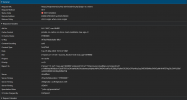
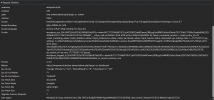
I am using Cloudflare, but I have ruled them out as the cause. I checked the browser DevTools Network tab during a 403 error, and the response headers show:
Server: cloudflare
X-Turbo-Charged-By: LiteSpeed
Because the LiteSpeed header is present, it indicates Cloudflare is passing the request successfully, but the x10hosting origin server is rejecting the request and returning the 403. There is also nothing logged in my WordPress error logs.
My Questions:
- Could staff please check the server's ModSecurity, firewall, or rate-limiting logs for my IP address? It seems like standard background WordPress requests are triggering a false-positive security block. (I am happy to provide my IP address via private message to staff if needed!)
- I have been running this site for a while and this never used to happen in the past, and my workflow hasn't changed. Were there any recent updates to the server's firewall rules or resource limits that might explain why this is suddenly happening now?
Kind regards,
Robin
 Have a nice day